- Published on
When function* JavaScript Finally Made Sense
- Authors
- Name
- @atbrakhi
Generator functions are one of those JavaScript features that I have known about for a long time, I think since around 2018, but never used much in regular code.
I had read about them years ago, probably in one of those famous JavaScript books. The idea was clear enough: a function can pause, yield a value, and continue later from the same place. But knowing how something works and knowing where it makes sense in real code are two different things.
I am also not a big fan of using fancy code or over-engineering things. So, most of the time, I did not need them. If I had a list, I used an array. If I needed to loop, I wrote a loop. If I needed to transform data, I used the simple JavaScript methods.
So this post is not a tutorial about generator functions. It is also not about saying generators are better than normal loops or arrays. This is about one small piece of DevTools code where a generator function felt like the right fit, and why that fit matters.
The code came up while working on Map preview support in Servo DevTools.

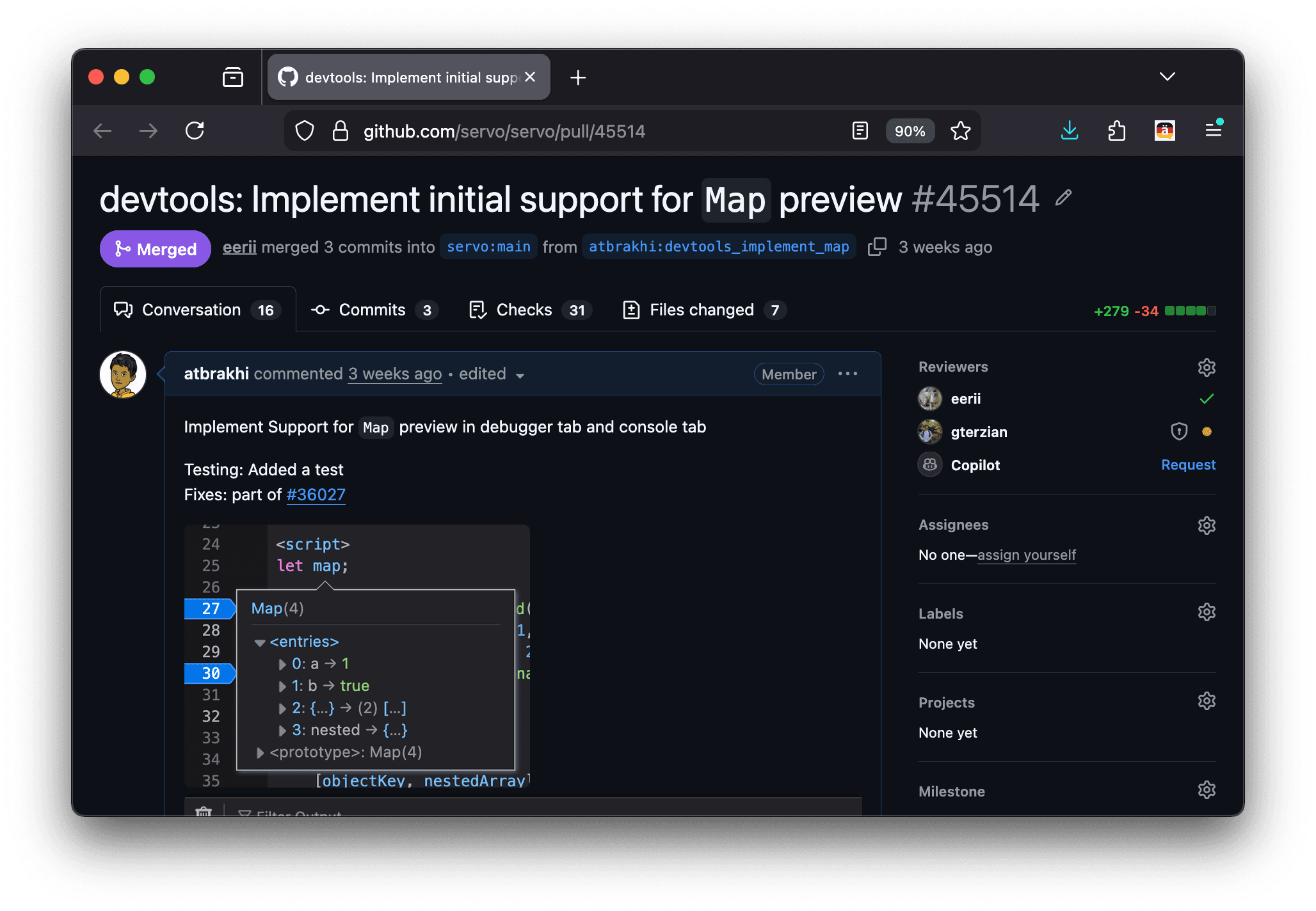
Servo’s implementation closely follows Firefox DevTools server. When we implement DevTools features in Servo, we often look at Firefox. Sometimes it is for the protocol. Sometimes it is for the behavior. It is important for us to look at Firefox because, in the end we are using Firefox client. We connect to it via RDP Remote Debugging Protocol, and hence we need to follow certain protocols there. We need to match the client expectations.
While looking at Firefox’s implementation, this one small helper stood out to me. It is doing one very specific thing: turning a debuggee iterator into something the preview code can consume one value at a time.
The function is small:
function* makeDebuggeeIterator(object) {
  while (true) {
    const nextValue = callPropertyOnObject(object, 'next')

    if (getProperty(nextValue, 'done')) {
      break
    }

    yield getProperty(nextValue, 'value')
  }
}
This is the code I want to talk about.
At first, it looks like a normal iterator loop. We call next, check done, and then take value. That is exactly how JavaScript iterators work. The only special thing here is yield.
But the reason yield is useful here is because the helper's job is to expose values one by one and let the caller decide what to do with them. Let us take a step back and look at the normal JavaScript version.
If you have a Map, you can do this:
const map = new Map([
  ['a', 1],
  ['b', true],
])

for (const entry of map.entries()) {
  console.log(entry)
}
This looks straightforward. map.entries() gives us an iterator, and for...of consumes it.
But behind the scenes in DevTools, things are not exactly like this. In the previewer code, we are not handed the Map the same way page JavaScript would be. We get a Debugger.Object that represents a value from the debuggee. And this mostly comes from SpiderMonkey. Note that SpiderMonkey is written in C++, and in Servo we have mozjs that acts as the bridge between Servo and SpiderMonkey.
So when Servo DevTools wants to preview a Map, it cannot simply call map.entries() like normal JavaScript code. It has to go through some functions that know how to call properties on the Debugger.Object API and how to read properties from values that come from the debuggee.
That is why the code does this:
const nextValue = callPropertyOnObject(object, 'next')
and this:
getProperty(nextValue, 'done')
getProperty(nextValue, 'value')
In normal JavaScript, this would look more like:
const nextValue = iterator.next()

if (nextValue.done) {
  // stop
}

const value = nextValue.value
The idea is the same, but the access path is different because this is DevTools code.
Now that we know that, the generator helper becomes easier to read. It is basically adapting a debuggee iterator into something the rest of the DevTools preview code can use with for...of.
function* makeDebuggeeIterator(object) {
  while (true) {
    const nextValue = callPropertyOnObject(object, 'next')

    if (getProperty(nextValue, 'done')) {
      break
    }

    yield getProperty(nextValue, 'value')
  }
}
We call next on the debuggee iterator. If it is done, we stop. Otherwise we yield the value. The caller gets one value at a time. This is the part where generator functions make sense.
We could also write this without a generator. For example:
function collectDebuggeeIterator(object) {
  const values = []

  while (true) {
    const nextValue = callPropertyOnObject(object, 'next')

    if (getProperty(nextValue, 'done')) {
      break
    }

    values.push(getProperty(nextValue, 'value'))
  }

  return values
}
This code is fine. It is not wrong. It calls next, checks done, stores the value, and returns an array.
But now the helper does two things. It walks the debuggee iterator, and it also decides to collect all the values into an array. That is not always the right responsibility for this helper.
In this specific Map preview feature, Servo does eventually build an array of preview entries. So I do not want to make this sound like a performance argument. This is not about saving memory with the generator, the preview will still be collected.
The main differences is where the collection happens.
makeDebuggeeIterator only knows how to walk the debuggee iterator. It does not decide what the final shape should be. The caller can decide that. If the caller wants to collect entries into an array, it can do that. If later another caller wants to stop early, it can do that too.
That keeps the code small. The next helper shows this better:
function enumMapEntries(obj, depth) {
  const entries = makeDebuggeeIterator(callPropertyOnObject(obj, 'entries'))
  return {
    *[Symbol.iterator]() {
      for (const entry of entries) {
        yield [getProperty(entry, 0), getProperty(entry, 1)].map((value) =>
          createValueGrip(value, depth)
        )
      }
    },
  }
}
There are a few things happening here.
First, we call entries on the Map object. In normal JavaScript, this would be like calling map.entries(). In Servo DevTools, it goes through callPropertyOnObject, because the Map belongs to the debuggee.
Then we pass the returned iterator to makeDebuggeeIterator. After that, entries can be used in a normal for...of loop.
Each item from a Map iterator is a pair. The first item is the key and the second item is the value. Again, because this is a debuggee value, we use getProperty(entry, 0) and getProperty(entry, 1) instead of treating it like a normal array.
Then we call createValueGrip for both values. DevTools cannot send raw debuggee values directly to the client (Firefox in our case). It needs to send a representation of those values, which is usually called a grip in the code.
So this helper has a clear job: take Map entries from the debuggee iterator and Turn them into preview values. Then the previewer can use it:
preview.entries = []
for (const entry of enumMapEntries(object, depth)) {
  preview.entries.push(entry)
}
This still reads like normal JavaScript. We create preview.entries, enumerate Map entries, and push them into the preview. The generator does not make this part harder to read. If anything, it keeps this part focused.
What I like here is the separation. makeDebuggeeIterator only knows how to walk the debuggee iterator. enumMapEntries knows how to turn each Map entry into key/value grips. The previewer decides to collect those entries into preview.entries.
This is why I like this as a real example of generator functions. A lot of examples explain syntax: yield 1, yield 2, yield 3. That is fine for learning the feature, but it does not always answer the question many have: where would I use this in real production code?
Here, the source already gives values one at a time. We are already dealing with an iterator. The preview code wants to consume those values in a normal loop. The generator sits between those two things.
I could have collected everything into an array first. That would also work. But then the lower-level function would be doing two jobs: walking the iterator and deciding the result should be a list. With the generator, it only walks the iterator.
This is also why it does not feel like using a fancy feature for the sake of it. If a function naturally returns a list, return a list. If a normal loop is clearer, use a normal loop. But here the code needs to keep asking for the next value until the iterator says it is done. That is exactly what the generator function* is made for.
There is some real DevTools complexity around it. We are reading values through Debugger.Object, and those reads can fail. The preview code needs to handle that. But that is a different responsibility and we don't need to go deeper into that in this blog at least, might write a different blog for that. The generator part has a very small job: call next, check whether it is done, yield the current value, and let the caller continue from there.
That is the main reason this felt like a good use case to write about. Not every loop needs a generator. But when the thing you are adapting is already an iterator, and the caller should consume it one value at a time, generator function* can be the simple and correct way to write it.
It doesn’t make sense everywhere, but here it does!
Thanks to Eri Pazos Pérez and PK for reading drafts of this.